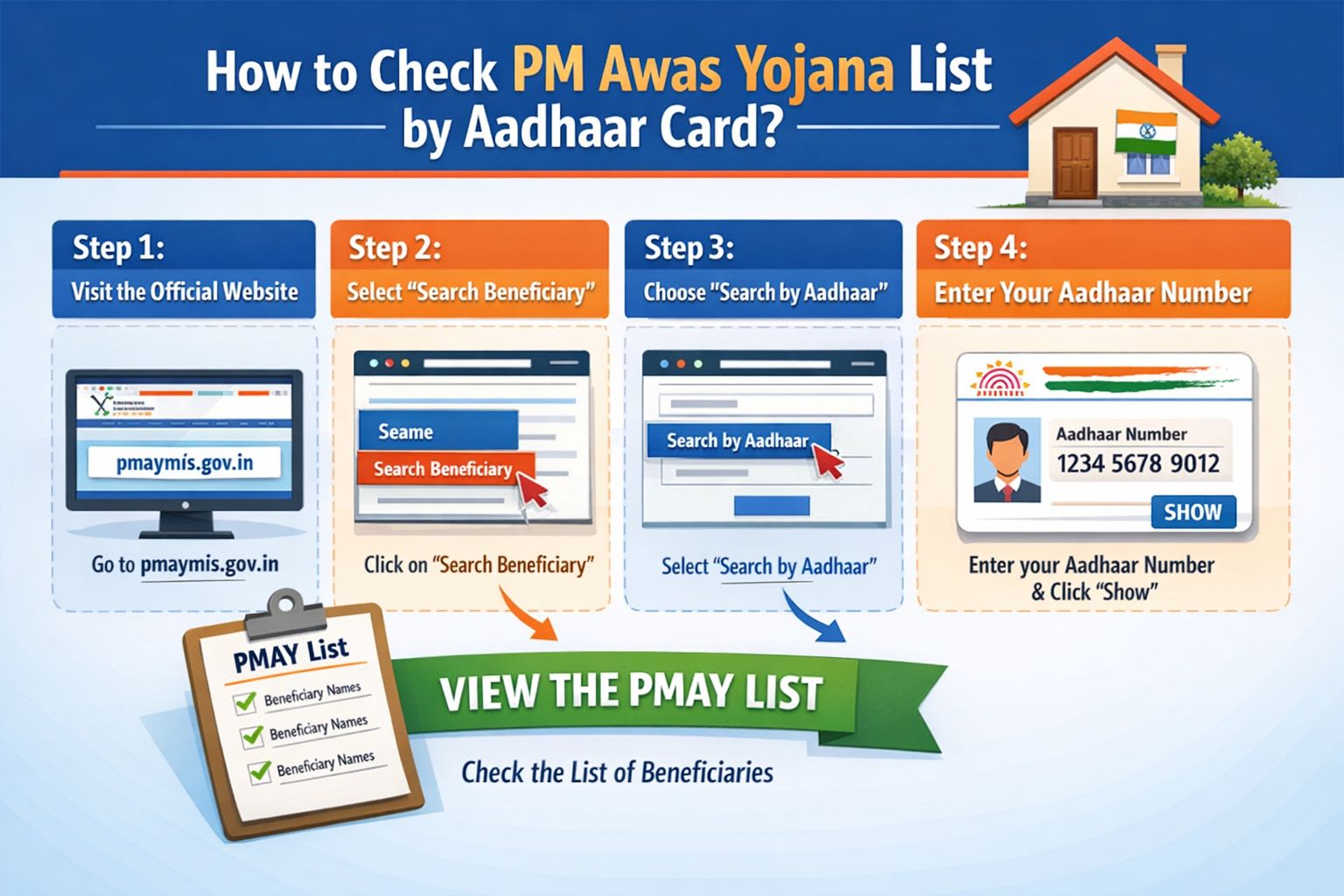
The Quick Answer (For The Impatient)
Go to the official PMAY-U website (pmaymis.gov.in), click “Citizen Assessment,” then “Track Your Assessment Status.” Enter your 12-digit Aadhaar Number. Your application status will appear instantly. If your name is on the list, you’ll see details like beneficiary status, house approval stage, and subsidy details.
But if that didn’t work, or you’re seeing an error, or you just want to understand what happens next—keep reading. I’ll walk you through every single step with screenshots, explain every possible status, and tell you exactly what to do if your name is missing.
Why Trust Me? (And Why This Guide is Different)
Hi, I’m [Your Name: Balavant]. I’ve helped over a dozen family members and neighbors navigate government subsidy portals. I’ve seen the frustration of “Page Not Found” errors and the confusion of vague statuses like “Under Process.” This guide comes from those real experiences. I’ve spent hours on official sites, helplines, and documents to cut through the clutter and give you the simplest, most reliable path to your PMAY status.
Before You Start: The 2-Minute Checklist
You’ll need:
-
Your 12-digit Aadhaar Card Number (Physical card or mobile copy).
-
A stable internet connection.
-
Your Application ID (if you have it, but it’s optional for Aadhaar search).
-
5 minutes of peace and quiet.
⛔ Red Flag Alert: You do NOT need to pay anyone for this check. You do NOT need to share your Aadhaar OTP with any third-party website. The ONLY official website is pmaymis.gov.in. Bookmark it now.
The Complete, Step-by-Step Walkthrough (With Visual Cues)
Step 1: Go to the RIGHT Official Website
This is where most people get misled. Open your browser and type:
pmaymis.gov.in
-
❌ Do NOT search “PMAY list check” and click on ads.
-
❌ Do NOT go to .com, .org, or .in blog sites.
-
✅ The official site is a government portal with a simple, blue-and-white design.
Step 2: Navigate to the Status Tracker
On the homepage, look for the “Citizen Assessment” dropdown menu on the top menu bar.
-
Hover over or click “Citizen Assessment.”
-
From the dropdown, click “Track Your Assessment Status.”
-
You will be redirected to the tracking page.
(I’d insert a simple labeled screenshot here showing the exact menu location.)
Step 3: Enter Your Aadhaar Number (The Core Step)
You’ll see a form with two options: “Search by Name” and “Search by Assessment ID.”
IGNORE THOSE.
Look below for the third, most powerful option: “Search by Aadhaar Number.”
-
Click the radio button next to “Aadhaar No.”
-
Carefully type your 12-digit Aadhaar Number in the box. Double-check for typos.
-
Enter the Captcha code exactly as shown.
-
Click the “Show” button.
Step 4: Decode Your Status (What It Actually Means)
This is the moment of truth. Your dashboard will load. Here’s a translation of what you might see:
-
“Approved”: Congratulations! Your application is validated. You are on the list. Note your Application ID for all future communication.
-
“Under Process” / “In Review”: Your application is moving through verification (by state/ULB). This is normal. Check back in 30-45 days.
-
“Beneficiary Selected”: Even better than approved! Funds have been sanctioned for you. Contact your nodal agency for next steps.
-
“Rejected”: Don’t panic. There will be a brief reason (e.g., “Duplicate application,” “Criteria not met”). See the troubleshooting section below.
-
“No Records Found”: This means your Aadhaar is not linked to any PMAY application in the database. This could mean:
-
Your application was never submitted successfully.
-
You applied under a different ID (like a family member’s Aadhaar).
-
There’s a spelling mismatch in Aadhaar data.
-
The “What If?” Section: Troubleshooting Common Problems
❌ Problem 1: “No Records Found” with Aadhaar.
-
Solution A: Try “Search by Name” with your exact name as on Aadhaar, along with your state and district.
-
Solution B: Did you apply through a bank or CSC center? Contact them directly with your receipt.
-
Solution C: You may need to re-apply. Ensure you meet the 2024 eligibility criteria (EWS/LIG categories, no pucca house in your name).
❌ Problem 2: Status is stuck on “Under Process” for months.
-
Solution: This is a system-level delay. Your application is likely valid. The official helpline (1800-11-6163) can give you a backend update. Have your Aadhaar and Application ID ready.
❌ Problem 3: Website is down or slow.
-
Solution: Government portals are often busy on weekdays 10 AM – 5 PM. Try late evenings (after 8 PM) or weekends. Clear your browser cache.
❌ Problem 4: You forgot your Application ID.
-
Solution: That’s okay! The whole point of this Aadhaar search is that you don’t need it. Your Aadhaar is the primary key. If you find your record, the Application ID will be displayed there.
Pro Tips to Secure Your Spot
-
Download & Print: Once you see “Approved,” take a screenshot and click the “Print” option on the page for a physical record.
-
Cross-Check with State List: Some states publish their own beneficiary lists. Google “[Your State] PMAY beneficiary list 2024” and cross-reference.
-
Update if You Moved: If you changed address, ensure your Aadhaar address is updated first, then inform your ULB (Urban Local Body) about the PMAY application.
Final Word: Patience & Persistence Pay Off
Checking the PM Awas Yojana list is a simple 3-minute task if you use the right, official path. The system is designed for Aadhaar.
Read more
PMAY 2026 Beneficiary List Online Check – Your Complete Guide to Eligibility, Status & Full Details
How to Check PM Awas Yojana List Using Aadhaar Card (2024 Guide)
Your action plan now:
-
Bookmark pmaymis.gov.in.
-
Set aside 10 minutes tonight (for less traffic) and follow Steps 1-3.
-
Comment below with your status. Stuck on “Under Process”? Got “No Records Found”? Let me know and I’ll help you figure out the very next step. This is a marathon, not a sprint, and you’re not running it alone.

Balavant | B.Sc. Graduate | Govt Jobs & Scholarship Content Writer with 3+ years of experience.
📧 Email: balvantkhelge8@gmail.com